Getting started
This page helps you get started with dbt-polars. It covers setting up a dbt-polars project and shows the main features of the library.
Installing dbt-polars
pip install dbt-polars
Initializing a dbt project
dbt init
dbt init asks a few questions to configure the dbt profile, which determines where and how dbt-polars writes data. For your first project, enter:
| Prompt | Value | Explanation |
|---|---|---|
| Project name | e.g. weather | Becomes the project folder name. |
| Database | polars | The adapter dbt uses to run your project, here: dbt-polars. |
| Schema | main (default) | Default schema for writing tables. For local catalog, it's the folder to which data is written. |
| Threads | 1 (default) | How many models dbt runs in parallel. Polars already parallelizes dataframe execution, so it's recommended to keep this at 1. |
| Catalog type | local | Catalogs determine where data is written. local writes to your local disk. |
| Root path | ./data (default) | Folder where tables are written in the local catalog. |
dbt init creates a project folder with this structure:
<project name>/
├── dbt_project.yml   # project settings, including which profile to use
├── models/           # SQL and Python models
│   └── example/      # example models created by dbt init
├── seeds/            # CSV files loaded with `dbt seed`
├── tests/            # singular data tests
├── macros/           # reusable SQL (Jinja) snippets
├── snapshots/        # snapshot definitions
└── analyses/         # SQL queries that are compiled but not run
See About dbt projects in the dbt documentation to learn more.
Connecting to storage
dbt-polars out-of-the-box supports writing to local disk and popular cloud storage locations (Azure, Iceberg catalogs, Databricks). These integrations are called catalogs in dbt-polars. It's possible to create a custom catalog to integrate with storage not yet supported.
Below, we show a sample configuration of the dbt profile for different catalogs:
- Local
- Azure
- Iceberg
- Databricks
- Custom
Stores tables as files on your local disk. See Local catalog.
Included in dbt-polars, no extra install needed.
# <project folder>/profiles.yml
<project name>:
  target: dev
  outputs:
    dev:
      type: polars
      schema: main
      catalog_type: local
      root: ./data   # folder where tables are written; must not contain spaces
Stores tables as files on Azure Blob Storage or ADLS Gen2. See Azure catalog.
Install the Azure catalog (dbt-polars-catalog-azure):
pip install 'dbt-polars[azure]'
# <project folder>/profiles.yml
<project name>:
  target: dev
  outputs:
    dev:
      type: polars
      schema: main
      catalog_type: azure
      account_name: mystorageaccount
      container: mycontainer
      # without credentials, DefaultAzureCredential is used (e.g. your Azure CLI login)
Stores tables in Apache Iceberg format, here with a SQLite metastore. Catalog options such as uri and warehouse are passed to pyiceberg's load_catalog, so any pyiceberg backend works (REST, Glue, Hive, …). See Iceberg catalog.
Install the Iceberg dependencies (pyiceberg):
pip install 'dbt-polars[iceberg]'
# <project folder>/profiles.yml
<project name>:
  target: dev
  outputs:
    dev:
      type: polars
      schema: main
      catalog_type: iceberg
      uri: sqlite:///./catalog.db      # Iceberg metastore
      warehouse: file:///./warehouse   # folder where table data is written
Registers tables in Databricks Unity Catalog, without using Databricks compute. See Databricks catalog.
Install the Databricks catalog (dbt-polars-catalog-databricks):
pip install 'dbt-polars[databricks]'
# <project folder>/profiles.yml
<project name>:
  target: dev
  outputs:
    dev:
      type: polars
      schema: main
      catalog_type: databricks
      catalog_name: my_uc_catalog
      host: https://my-workspace.cloud.databricks.com
      token: "{{ env_var('DATABRICKS_TOKEN') }}"
Need a different storage backend? You can write your own catalog as a separate Python package and select it with catalog_type. See Custom catalogs.
Install your catalog package next to dbt-polars:
pip install <your-catalog-package>
# <project folder>/profiles.yml
<project name>:
  target: dev
  outputs:
    dev:
      type: polars
      schema: main
      catalog_type: my_custom
      # options defined by your catalog
Materializations
Materializations determine how dbt writes data. dbt-polars supports table, incremental and ephemeral materializations. view materializations are not supported.
The project created via dbt init uses the view materialization. Change this in dbt_project.yml:
Created by dbt init
# <project folder>/dbt_project.yml
name: '<project name>'
version: '1.0.0'

profile: '<project name>'

model-paths: ["models"]
analysis-paths: ["analyses"]
test-paths: ["tests"]
seed-paths: ["seeds"]
macro-paths: ["macros"]
snapshot-paths: ["snapshots"]

clean-targets:
  - "target"
  - "dbt_packages"

models:
  <project name>:
    example:
      +materialized: view
Change to
# <project folder>/dbt_project.yml
name: '<project name>'
version: '1.0.0'

profile: '<project name>'

model-paths: ["models"]
analysis-paths: ["analyses"]
test-paths: ["tests"]
seed-paths: ["seeds"]
macro-paths: ["macros"]
snapshot-paths: ["snapshots"]

clean-targets:
  - "target"
  - "dbt_packages"

models:
  <project name>:
    +materialized: table  # or ephemeral
All models are now materialized as tables, unless a model sets a different materialization.
Running the project
From the project folder, run:
dbt run
When you use the local catalog with root data/, this generates the following files:
<project name>/
└── data/                        # root path
    └── main/                    # schema name
        ├── my_first_dbt_model/  # dbt model
        │   ├── _delta_log/
        │   │   └── 00000000000000000000.json
        │   └── part-00001-<uuid>-c000.snappy.parquet
        └── my_second_dbt_model/
            ├── _delta_log/
            │   └── 00000000000000000000.json
            └── part-00001-<uuid>-c000.snappy.parquet
When you use a different catalog (Azure, Databricks, ...) this data is written to cloud storage instead.
Loading data
For this example, we use hourly weather data by Open-Meteo.com. Download open_meteo_raw.csv and put it in the seeds/ folder. Then load it as a table:
dbt seed
This writes the open_meteo_raw table to data/main/, next to the example models.
Transforming data
In dbt, each .py or .sql file in the models folder defines a model. A model is a data transformation which can be materialized as a table.
In dbt-polars both Python and SQL models are efficient, so pick the languague that fits the transformation. The code below calculates aggregates for the seeded weather data.
- Python
- SQL
<project name>/
├── models/
│   ├── example/
│   │   ├── my_first_dbt_model.sql
│   │   ├── my_second_dbt_model.sql
│   │   └── schema.yml
│   └── daily_weather.py
└── seeds/
    └── open_meteo_raw.csv
# <project name>/models/daily_weather.py
import polars as pl


def model(dbt, session) -> pl.LazyFrame:
    hourly: pl.LazyFrame = dbt.ref("open_meteo_raw")
    return (
        hourly.group_by("date")
        .agg(
            pl.col("temperature_2m").min().alias("min_temperature"),
            pl.col("temperature_2m").max().alias("max_temperature"),
            pl.col("precipitation").sum().alias("total_precipitation"),
        )
        .sort("date")
    )
dbt.ref("open_meteo_raw") returns the seeded table as a Polars LazyFrame.
<project name>/
├── models/
│   ├── example/
│   │   ├── my_first_dbt_model.sql
│   │   ├── my_second_dbt_model.sql
│   │   └── schema.yml
│   └── daily_weather.sql
└── seeds/
    └── open_meteo_raw.csv
-- <project name>/models/daily_weather.sql
select
    date,
    min(temperature_2m) as min_temperature,
    max(temperature_2m) as max_temperature,
    sum(precipitation) as total_precipitation
from {{ ref('open_meteo_raw') }}
group by date
order by date
{{ ref('open_meteo_raw') }} refers to the seeded table.
Run dbt run again to write the new daily_weather table.
Ephemeral models
dbt supports ephemeral models. An ephemeral model is not written to storage. Like an intermediate function in Python, it is computed as part of every model that references it. This lets you split a large transformation into smaller steps, without storing each step as a table.
The ephemeral model open_meteo_clean below renames the column temperature_2m to temperature:
- Python
- SQL
# <project name>/models/open_meteo_clean.py
import polars as pl


def model(dbt, session) -> pl.LazyFrame:
    dbt.config(materialized="ephemeral")
    hourly: pl.LazyFrame = dbt.ref("open_meteo_raw")
    return hourly.rename({"temperature_2m": "temperature"})
-- <project name>/models/open_meteo_clean.sql
{{ config(materialized="ephemeral") }}

select
    time,
    temperature_2m as temperature,
    precipitation,
    date
from {{ ref('open_meteo_raw') }}
The meteo_daily model uses it to compute daily averages:
- Python
- SQL
# <project name>/models/meteo_daily.py
import polars as pl


def model(dbt, session) -> pl.LazyFrame:
    clean: pl.LazyFrame = dbt.ref("open_meteo_clean")
    return clean.group_by("date").agg(
        pl.col("temperature").mean(), pl.col("precipitation").mean()
    )
-- <project name>/models/meteo_daily.sql
select
    date,
    avg(temperature) as temperature,
    avg(precipitation) as precipitation
from {{ ref('open_meteo_clean') }}
group by date
After dbt run, data/main/ contains a meteo_daily table, but no open_meteo_clean.
open_meteo_clean model can be combined with the SQL version of meteo_daily.Generating docs
dbt docs generate
dbt docs serve
This creates and starts a documentation website for the dbt project. It includes a lineage graph showing how models depend on each other. For the project so far:
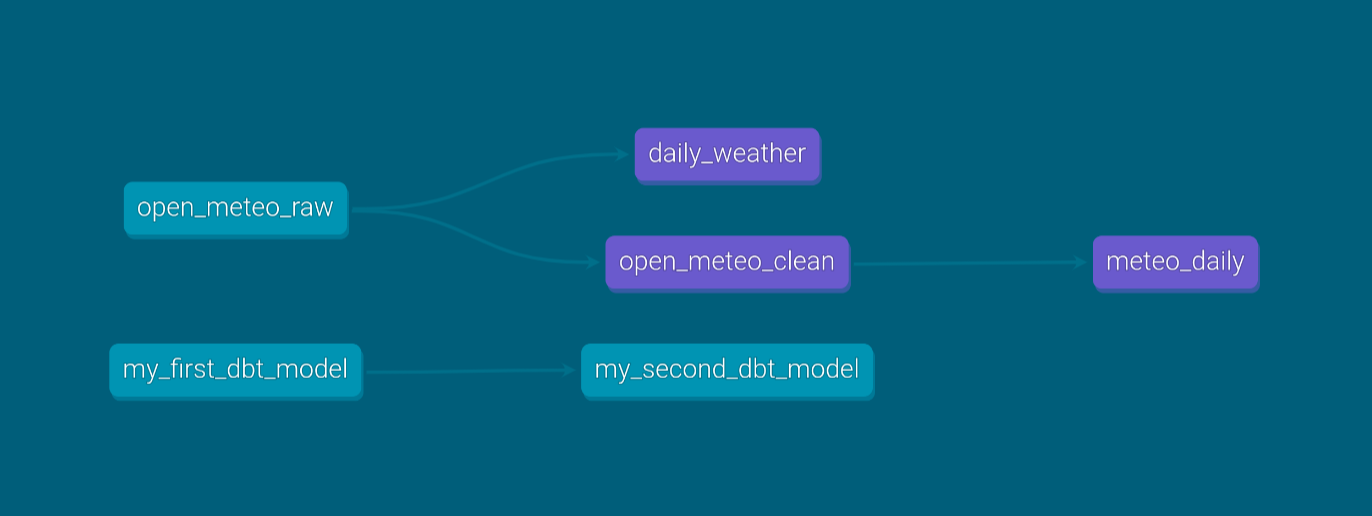
By using ref we enable dbt to collect this lineage. See About documentation in the dbt documentation to learn more.
Data tests
Data tests improve the reliability of your data. In dbt, data tests are placed in the tests/ folder and return the rows that break a rule. Tests succeed when no rows are returned.
The test below fails when a daily average temperature is below -20°C or above 40°C:
- Python
- SQL
# <project name>/tests/meteo_daily_temperature_range.py
import polars as pl

def test(dbt, session):
    daily: pl.LazyFrame = dbt.ref("meteo_daily")
    return daily.filter((pl.col("temperature") < -20) | (pl.col("temperature") > 40))
True means the test passed.-- <project name>/tests/meteo_daily_temperature_range.sql
select *
from {{ ref('meteo_daily') }}
where temperature < -20 or temperature > 40
Run all tests with:
dbt test
Incremental data ingestion
The seed from Loading data is a static file, so it never contains the latest weather data. A Python model can fetch the data itself, which brings ingestion into dbt.
Replace the seed seeds/open_meteo_raw.csv with a model models/open_meteo_raw.py. The name stays the same, so the models that reference it need no changes. Your folder structure is now:
<project name>/
├── models/
│   ├── example/
│   │   ├── my_first_dbt_model.sql
│   │   ├── my_second_dbt_model.sql
│   │   └── schema.yml
│   ├── daily_weather.py (or .sql)
│   ├── meteo_daily.py (or .sql)
│   ├── open_meteo_clean.py (or .sql)
│   └── open_meteo_raw.py
├── seeds/
│   └── .
└── tests/
    └── meteo_daily_temperature_range.py (or .sql)
The model below fetches hourly weather data from the Open-Meteo API:
dbt.config(...)makes the modelincremental. Withdelete+insertandunique_key="date", rows for a date that is fetched again replace the existing rows instead of being added twice. The table is stored as CSV.run_dateis yesterday.- On the first run, the model fetches all data from
START_DATEuntilrun_date. On later runs,dbt.is_incrementalis true and it only fetchesrun_date. - The API response is returned as a Polars DataFrame, with a
datecolumn derived from the timestamp.
The model uses the requests library, which is not installed with dbt-polars:
pip install requests
# <project name>/models/open_meteo_raw.py
import polars as pl
import requests

from datetime import date, timedelta

LATITUDE = 52.54833
LONGITUDE = 13.407822
START_DATE = date(2026, 1, 1)


def model(dbt, session) -> pl.DataFrame:
    dbt.config(
        materialized="incremental",
        incremental_strategy="delete+insert",
        unique_key="date",
        file_format="csv",
    )

    run_date = date.today() - timedelta(days=1)

    start_date = run_date if dbt.is_incremental else START_DATE

    response = requests.get(
        "https://archive-api.open-meteo.com/v1/archive",
        params={
            "latitude": LATITUDE,
            "longitude": LONGITUDE,
            "start_date": start_date.isoformat(),
            "end_date": run_date.isoformat(),
            "hourly": "temperature_2m,precipitation",
        },
    )
    response.raise_for_status()
    hourly = response.json()["hourly"]

    return (
        pl.DataFrame(
            {
                "time": hourly["time"],
                "temperature_2m": hourly["temperature_2m"],
                "precipitation": hourly["precipitation"],
            }
        )
        .with_columns(pl.col("time").str.to_datetime("%Y-%m-%dT%H:%M"))
        .with_columns(pl.col("time").dt.strftime("%Y-%m-%d").alias("date"))
    )
Build the table using either
dbt run --full-refresh # reload the full table
or
dbt run # incremental ingestion
dbt automatically runs a full refresh for new models. Subsequent runs are by default incremental.
In production, run_date usually comes from your orchestrator. Pass it as an environment variable:
RUN_DATE=2026-10-05 dbt run
And read it in the model:
import os

run_date = date.fromisoformat(os.environ["RUN_DATE"])